

Since Alteryx is always improving, it is important to keep track of which version of Alteryx Designer your workflows were created in. Not doing so can lead to version compatibility errors when trying to open workflows on an older version of Alteryx than the workflow was created in, since tool configurations sometimes get updated. It is also very important to keep track of which version of Designer your workflows are created in when saving them to your organization’s Gallery, as the Gallery is unable to run workflows that were created in a newer version of Alteryx.
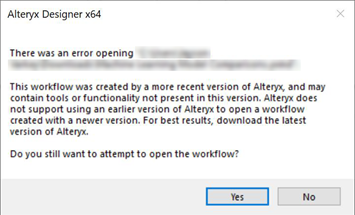
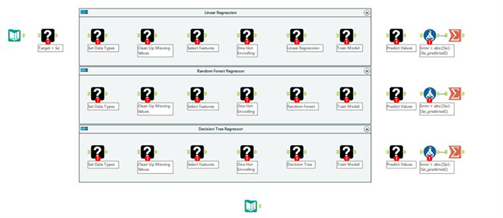
Additionally, new tools may be added with new versions of Alteryx. For example, the Intelligence Suite of tools were added with Alteryx version 2020.2. Opening a workflow with these tools on an older version will replace the incompatible tools as shown below.
Alteryx’s backwards compatibility allows users to open old workflows in newer versions of Designer, but it can be hard to tell when a tool was updated for additional configurations. For example, a user has several workflows made in v2019 of Designer that use the Data Cleansing tool. Running the workflows in v2020 of Designer will yield the same results, but the Data Cleansing tool now has the added capability to remove null data that the user wants to incorporate into his or her workflow. Updating each workflow will take time, and it can be difficult to tell which workflow has been updated to include this new functionality. It would be useful to know which workflows were made in v2019 so that the user can know which ones still need to be updated.
WAM makes it easy to keep track of what version of Alteryx each workflow was made in by allowing users to create an Alteryx Versions Overview report. To do so, navigate to the Reporting tab of WAM, select the workflows that will be logged, and run the Alteryx Versions Overview report in the Management section.
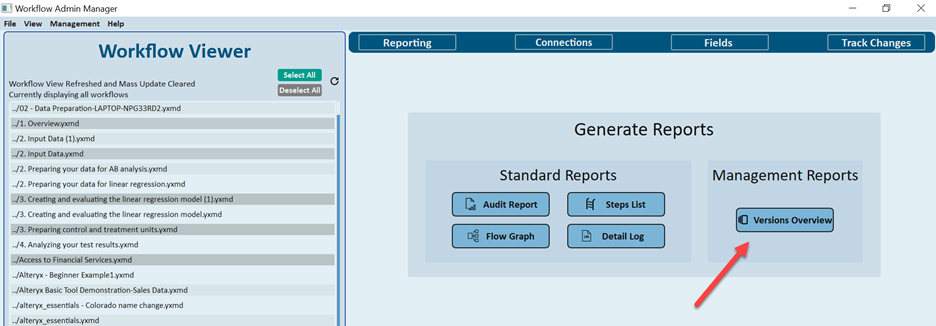
The report will then be saved in the “Management Reports” folder of the output folder specified in the settings. The report shows each version of Alteryx present in the selection as well as the file paths of the workflows made in each.
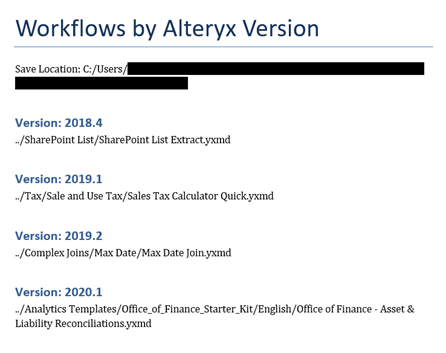
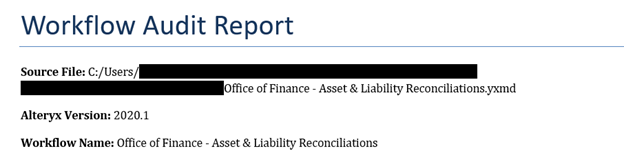
Additionally, each audit report contains the version of the Alteryx workflow, so for workflows that are continuously updated, it is easy to tell which versions of the workflow correspond to which version of Designer.
Using the version tracking feature of Audit Reports and Version Overview reports can give users insight into when workflows were last updated as well as which versions of Designer they are compatible with, since it can be difficult to keep everybody in an organization on the same version at all times. Compatibility issues can come up when sharing workflows with coworkers or uploading workflows to a server, so it is important to know which workflows might cause these issues beforehand. This also helps users keep track of the workflows that could be updated with new functionality or improvements that come with newer versions of Alteryx.